1 · What it does
When you show a struck-through “通常価格” next to a sale price in Japan, the 景品表示法 (Act against Unjustifiable Premiums and Misleading Representations) expects that regular price to be backed by real sales history — the Consumer Affairs Agency's eight-week rule. This app records your selling prices continuously, checks whether that history substantiates your 通常価格, and shows a verified note when it does.
It uses only your offered-price history — never orders or actual purchase records (which are not accessed and not required here). It never invents a price; if history can't back the display, the note stays hidden. The app reports a computed fact, never a “lawful/unlawful” verdict.
2 · Getting started
3 · Select the Japan market
On the dashboard, the market card offers one option — 日本 — 景品表示法 二重価格表示(消費者庁ガイドラインの8週間ルール). Select it to start assessing. The eight-week rule broadly expects the 通常価格 to have been offered for more than half of the recent period (and recently enough) before it can back a sale display.
4 · Nothing to enter — automatic
There is no manual price entry. Prices are recorded at install, at every price change (Shopify webhook on save), at a daily automatic snapshot, and via “Record snapshot now”. Only your publicly offered selling price counts — discount codes and personalised prices never enter the calculation.
5 · Show it on the storefront
Dashboard → Open theme editor, add the 「二重価格 表示バッジ」 app block inside the product information section (just below the price), and Save.
What appears
- When history supports the 通常価格: 「通常価格の販売履歴を確認済み」.
- While history is still building: an honest, price-free line — 「価格履歴を記録中(景品表示法の二重価格を検証しています)」 — so a discounted product is never blank.
- On a non-discounted product: nothing (expected).
History counts from when the app started recording, not from when you added the block. The eight-week window must fill before the verified note can appear.

6 · Check your 二重価格 displays
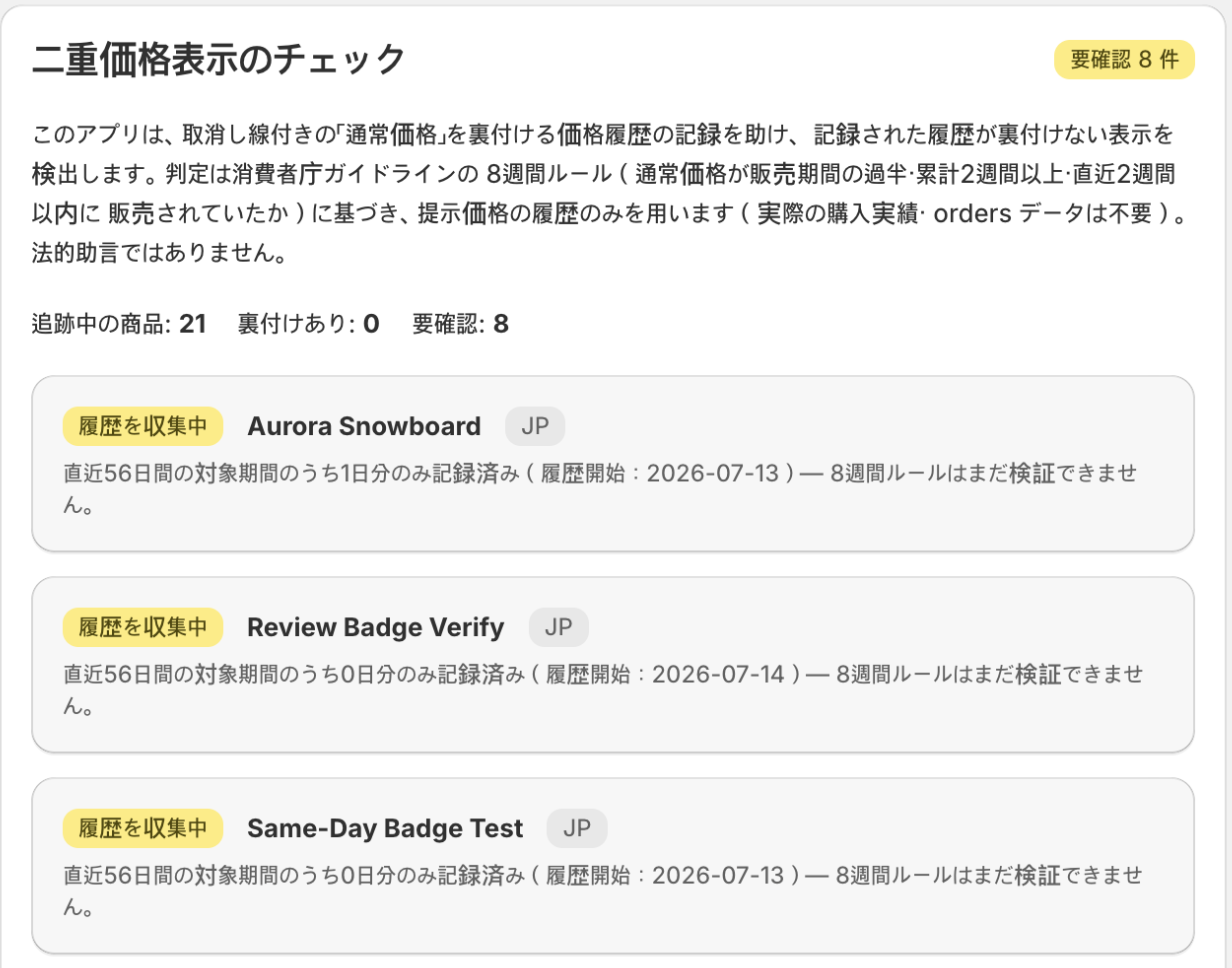
The dashboard 「二重価格表示のチェック」 card lists products worst-first, each with a status and the basis (in Japanese) behind it:
| Status | Meaning |
|---|---|
| 通常価格の裏付けあり | History supports the regular price. |
| 通常価格の裏付け不足(併記が必要) | Not substantiated — review before displaying, or add the required note. |
| 履歴を収集中 | Not enough history yet. |
| 二重価格表示なし | Not discounted — nothing to assess. |
Each row shows the basis in Japanese — e.g. 「通常価格が8週間ルールの要件を満たしていません:販売期間30日のうち20%のみ通常価格で販売(50%以下)…」. Actual purchase-record tests are out of scope; the app uses offered-price history only, so it needs no order or customer data.
7 · Plans
| Plan | What you get |
|---|---|
| Free | Everything: all products, the storefront verified badge, and the audit CSV export (監査用CSV). |
There is one plan and it is free — no product cap, no locked features, nothing to approve.
Price history records for your whole catalog from install.
8 · Commonly confusing (read this)
- “The dashboard / storefront is empty.” Select the Japan market first (§3). The app records history immediately, but can't assess or display until the market is selected.
- It tracks every price edit, wherever you make it. Price changes arrive by Shopify webhook — admin, bulk editor, CSV import, or another app — so the recorded history never depends on which editor you use.
- Discount codes don't enter the assessment. The 通常価格 check uses the prices you publicly offered; personalized and code-based prices are never counted.
- The verified note takes time. The eight-week window must fill first, counting from when the app began recording — not from when you placed the block. A sale already running before install won't get a badge; start cleanly with your next reduction.